
Purble Place Download & Install
Windows 10, 11, 7 & Mac every working method to get the classic game back, plus the browser version with zero setup.
Purble Place is not on the Microsoft Store and is not built into Windows 10 or Windows 11. To get the real desktop game, download the free Windows 7 Games pack (it includes Purble Place) and install it runs perfectly on Windows 10 and 11. Prefer zero setup? Play it in your browser instead.
Disclaimer: This is a fan-made resource and is not affiliated with, endorsed by, or sponsored by Microsoft or Oberon Media.
If you’re trying to download Purble Place and put it back on your computer, this guide walks you through every working method in 2026 for Windows 11, Windows 10, Windows 7, and Mac. You’ll learn the easy way (a free games pack), the purist way (copying the original files), and the safest way for a child’s PC. You’ll also see which download sites to avoid, because a lot of “Purble Place download” pages bundle junk you don’t want.
Is Purble Place Free to Download?
Yes, Purble Place is free it was always free because it came pre-installed with Windows Vista and Windows 7. But here’s the part most download pages get wrong: Purble Place is not sold or offered on the Microsoft Store, and it is not included in Windows 10 or Windows 11.
Microsoft removed Purble Place when it moved to Windows 8 in 2012, and it never brought the game back. So if a site tells you to “install Purble Place from your Windows 11 gaming section” or “download it from the Microsoft Store,” that information is simply wrong.
What actually works today:
Purble Place Download Methods (2026)
There are four realistic ways to get Purble Place today. Three install the real desktop game; the fourth skips downloading entirely.
The Easy Way
Windows 7 Games Pack
Download one free installer that bundles all the classic Windows 7 games, then tick only Purble Place. This is the method Microsoft’s own community advisors point people to, and it works on both Windows 10 and Windows 11.
The Purist Way
Copy the Original Files
If you still have (or can borrow) a Windows 7 or Vista PC, you copy the genuine game folder across. These are the exact, unmodified Microsoft files, so it’s the cleanest option.
The Safe-for-Kids Way
Windows 7 Virtual Machine
You run Windows 7 inside a virtual machine (using VirtualBox, VMware, or UTM) and play Purble Place there. It’s more work, but the game is completely walled off from your main system.
The No-Download Way
Play in Your Browser
You skip installation and play the full game online. It’s the fastest and safest route for most people. Play Purble Place online here »
How to Download & Install Purble Place on Windows 10 & 11
This is the method that works for almost everyone. The same Windows 7 Games pack installs Purble Place on both Windows 10 and Windows 11 the steps are identical.
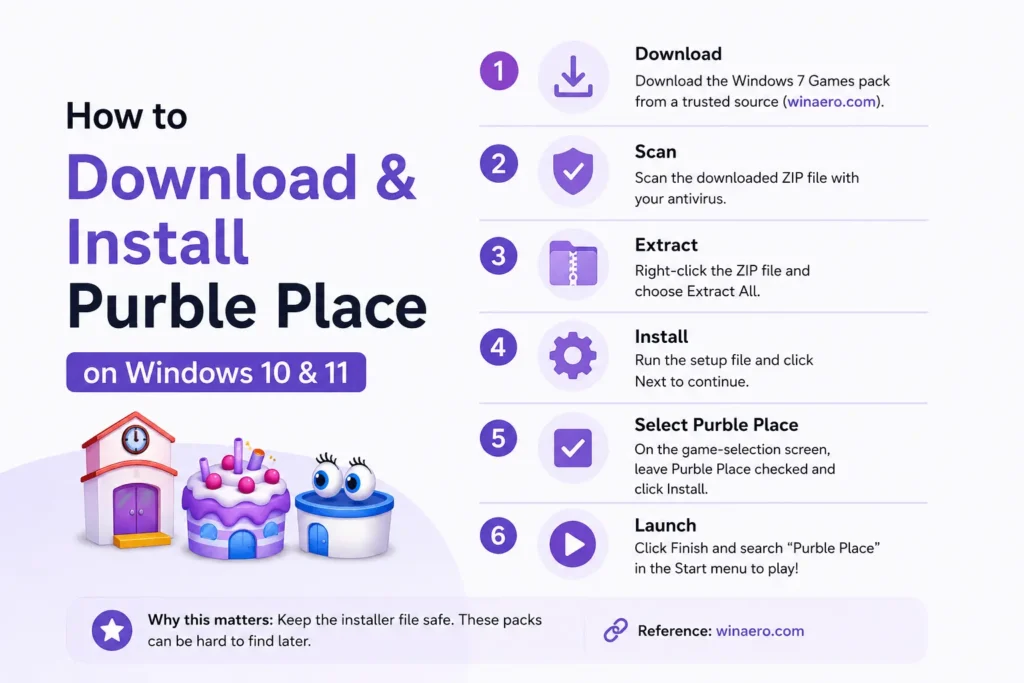
1. Download the Windows 7 Games pack
Get the pack from a reputable source. Winaero hosts the most widely recommended clean version (search “Winaero Windows 7 Games for Windows 10 and 11”). The download is a small ZIP file.
2. Scan the file before you open it
Right-click the downloaded ZIP and scan it with your antivirus, or upload it to a free online scanner. This takes ten seconds and it’s worth it for any legacy installer.
3. Extract the ZIP
Right-click the file and choose Extract All (Windows has this built in you don’t need WinZip or 7-Zip, though either works). You’ll get a setup file inside.
4. Run the installer
Double-click the setup file. When the welcome screen appears, click Next.
5. Select Purble Place
On the game-selection screen, every classic game is ticked by default. Untick the ones you don’t want and leave Purble Place checked. Click Install.
6. Launch the game
Click Finish, then open the Start menu and search “Purble Place.” Pin it to Start or create a desktop shortcut so it’s easy to find later.
How to Get Purble Place on Windows 7 & Vista
If you’re on Windows 7 or Windows Vista, you don’t download anything Purble Place ships with the operating system. Open the Start menu, go to the Games folder, and it’s there.
On the Business and Enterprise editions of Vista, games are switched off by default. To turn them on:
Install Purble Place by Copying the Original Files
Want the genuine, untouched Microsoft version on a modern PC? Copy it straight from a Windows 7 or Vista computer.
If it won’t launch, set compatibility mode:
How to Play Purble Place on Mac
There is no native Mac version of Purble Place it’s a Windows game, full stop. But you still have three routes:
- Run Windows in a virtual machine. Use Parallels Desktop, UTM, or VMware Fusion to run Windows on your Mac, then install the Windows 7 Games pack inside it. This works on both Apple Silicon (M1/M2/M3) and Intel Macs.
- Boot Camp (Intel Macs only). Older Intel Macs can dual-boot into Windows and install the game there. Apple Silicon Macs can’t use Boot Camp.
- Just play in the browser. Honestly, for most Mac users this is the answer. It’s instant, free, and needs no Windows at all.
So, on a Mac, I’d skip the VM hassle and play the browser version unless you specifically want the original desktop executable.
Purble Place on Android & iPhone
There is no official Purble Place app from Microsoft on Google Play or the App Store. What you’ll find are unofficial clones and remakes made by third parties, plus APK files floating around download sites.
- On the App Store / Google Play: any “Purble Place” listing is fan-made, not the original. Quality varies.
- APK files: be cautious. Unofficial APKs are a common way to pick up malware, so scan anything you sideload or better, don’t.
- The reliable option: open this site in your phone’s browser and play. The online version supports touch, so it works on phones and tablets with nothing to install.
Which Download Method Is Best? (Comparison)
| Method | Works On | Difficulty | Safety | Best For |
|---|---|---|---|---|
| Windows 7 Games pack | Windows 10 & 11 | Easy | High (from a trusted source) | Most people |
| Copy original files | Windows 10 & 11 | Medium | Highest (genuine files) | Purists with a Win 7 PC handy |
| Windows 7 virtual machine | Windows & Mac | Hard | Highest (fully isolated) | Kids’ PCs & cautious users |
| Browser version | Any device | Easiest | Highest (nothing installed) | Anyone who just wants to play |
So, the Windows 7 Games pack is the best download method for most people — it’s quick, free, and puts the real game on your PC. But if you don’t actually need the desktop app, the browser version wins on speed and safety.
Troubleshooting: Purble Place Won’t Open
Legacy games sometimes need a nudge on modern Windows. Work through these in order:
Safe Download & Install Tips
Legacy game downloads are a magnet for shady sites. These habits keep you safe.
Use a source people trust.
Winaero’s games pack is the most-recommended clean copy. Avoid no-name “purbleplace-download-free” pages.
Scan every file first.
Run your antivirus on the ZIP, or drop it into a free online scanner. Ten seconds, real peace of mind.
Say no to download managers.
If a site forces a “download manager” or “custom launcher,” leave. A clean installer is a single direct file.
Read the installer checkboxes.
Bundled installers pre-tick extra toolbars or apps. Untick anything that isn’t Purble Place.
Keep the installer after install.
These packs vanish from the web over time. Stash a copy so you never have to hunt for a clean one again.
Use a VM for a child’s PC.
Running Purble Place in an isolated Windows 7 VM means a bad file can’t touch the main system.
Prefer the browser if unsure.
If any download feels sketchy, don’t force it. The online version gives you the full game with zero risk.
Run as administrator first time.
On Windows 10/11, launching the game as admin once clears up most permission-related failures.
Turn on Windows 7 compatibility.
If the game stutters or won’t start, this fixes it more often than anything else.
Make a desktop shortcut.
Point it at PurblePlace.exe so the game is one click away for you or your kids.
Purble Place Download FAQs
Final Thoughts
Getting Purble Place back is easier than the internet makes it look. For most people on Windows 10 or 11, the Windows 7 Games pack is the whole answer download it from a source you trust, tick Purble Place, done. If it’s for a child’s computer or you’re security-conscious, run it in a Windows 7 virtual machine. And if you just want to play right now without touching an installer, I really suggest the browser version it’s free, instant, and completely safe.